RFC
StaticMCP - Static Model Context Protocol
Version: 0.1
Status: Draft
Date: 2025-08-06
Abstract
This document defines StaticMCP, an extension to the Model Context Protocol (MCP) that enables serving AI model context through pre-generated static files rather than dynamic server applications. StaticMCP maintains full compatibility with the MCP specification while offering significant improvements in performance, cost, scalability, and deployment simplicity.
1. Introduction
1.1 Background
The Model Context Protocol (MCP) provides a standardized interface for AI models to interact with external tools and resources. However, many use cases involve serving relatively static data that doesn't require real-time computation or database queries. Traditional MCP implementations in these scenarios introduce unnecessary complexity and operational overhead.
1.2 Motivation
StaticMCP addresses several key challenges:
- Performance: Eliminates runtime computation for faster response times
- Cost: Reduces infrastructure requirements to static file hosting
- Reliability: Removes server-side failure points and scaling bottlenecks
- Simplicity: Enables deployment to any static hosting platform
- Caching: Leverages existing web caching infrastructure at all levels
1.3 Scope
This RFC defines:
- The StaticMCP file structure and organization
- Mapping between MCP operations and static file paths
- Bridge server requirements and behavior
- Compatibility requirements with existing MCP clients
2. Architecture Overview
2.1 Core Principles
StaticMCP operates on four fundamental principles:
- Pre-computation: All responses are generated at build time
- File-based mapping: MCP operations map directly to file system paths
- Standard compliance: Full compatibility with MCP protocol semantics
- Web-native: Leverages standard HTTP caching and CDN capabilities
2.2 System Components
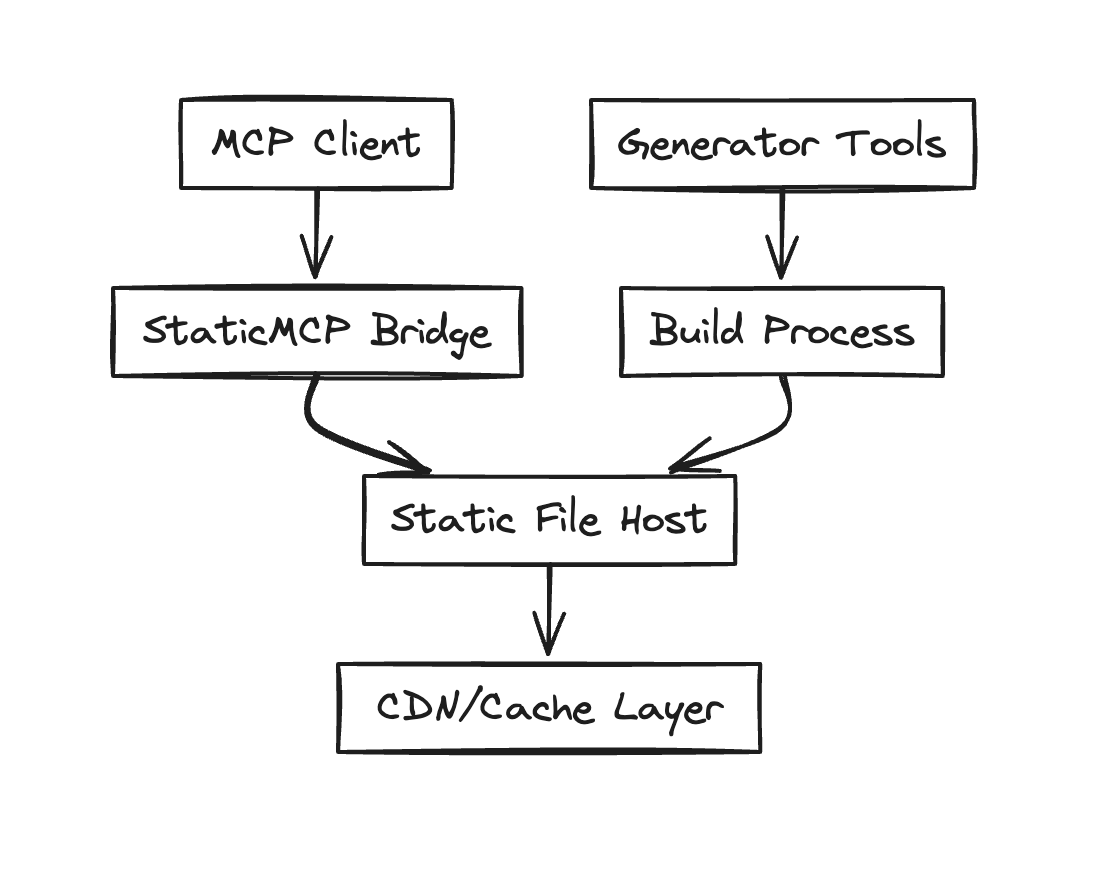
- Generator Tools: Scripts/applications that create static files
- Build Process: Orchestrates file generation and validation
- Static File Host: Standard web server or CDN hosting JSON files
- StaticMCP Bridge: Lightweight proxy translating MCP to HTTP requests
- MCP Client: Standard MCP client (AI models, applications)
3. File Structure Specification
3.1 Directory Layout
staticmcp-root/
  ├── mcp.json                     # Server manifest
  ├── resources/                   # Resource responses
  │     ├── {encoded-uri}.json     # Individual resource files
  │     └── index.json             # Resource listing
  └── tools/                       # Tool call responses
        └── {tool-name}/           # Tool-specific directory
              └── {arg}.json       # Parameterized responses
3.2 Manifest File (mcp.json)
The root manifest file defines server capabilities:
{
  "protocolVersion": "2025-06-18",
  "serverInfo": {
    "name": "My StaticMCP Server",
    "version": "1.0.0"
  },
  "capabilities": {
    "resources": [
      {
        "uri": "file://README.md",
        "name": "Project README",
        "description": "Main project documentation",
        "mimeType": "text/markdown"
      }
    ],
    "tools": [
      {
        "name": "search",
        "description": "Search through project content",
        "inputSchema": {
          "type": "object",
          "properties": {
            "query": {
              "type": "string",
              "description": "Search query"
            }
          },
          "required": ["query"]
        }
      }
    ]
  }
}
4. Request Mapping
4.1 Resource Requests
MCP resource requests map to files in the resources/ directory:
| MCP Request | File Path |
|---|---|
resources/read with URI file://README.md | resources/README.md.json |
resources/read with URI web://docs/api | resources/docs/api.json |
4.1.1 URI Encoding Rules
StaticMCP uses a standardized filename encoding convention to ensure consistent, predictable filenames across all implementations. See the Filename Encoding Convention in the standard specification for complete details.
Basic encoding rules:
- Remove everything before
://(inclusive) /refers to directory structure- Apply StaticMCP filename encoding (Unicode normalization, lowercase, safe characters only)
- Handle long filenames with truncation and hashing
4.2 Tool Requests
Tool calls map to files in the tools/{tool-name}/ directory:
| Tool Call | File Path |
|---|---|
search("rust") | tools/search/rust.json |
5. Response Format
5.1 Resource Response Files
{
  "uri": "file://README.md",
  "mimeType": "text/markdown",
  "text": "# My Project\n\nThis is the project README..."
}
5.2 Tool Response Files
{
  "content": [
    {
      "type": "text",
      "text": "Found 3 results for 'rust':\n1. Rust implementation guide\n2. Rust vs Python comparison\n3. Memory safety in Rust"
    }
  ]
}
6. Bridge Server Specification
6.1 Requirements
The StaticMCP bridge server MUST:
- Accept standard MCP JSON-RPC requests
- Translate requests to appropriate file paths
- Return standard MCP responses
- Handle file not found cases gracefully
- Support proper HTTP caching headers
6.2 Error Handling
| Scenario | HTTP Status | MCP Response |
|---|---|---|
| File not found | 404 | Resource/tool not available error |
| Invalid JSON | 500 | Internal server error |
| Bridge unavailable | 503 | Service temporarily unavailable |
7. Generation Process
7.1 Build Pipeline
- Data Collection: Gather source data from various inputs
- Response Generation: Create individual JSON response files
- Manifest Creation: Generate the root
mcp.jsonfile - Validation: Verify file structure and JSON validity
- Optimization: Compress and optimize files for delivery
- Deployment: Upload to static hosting platform
7.2 Incremental Updates
For efficiency, generators SHOULD support incremental builds:
- Track file modification times
- Maintain dependency graphs
- Only regenerate changed files
- Update manifest with new timestamps
8. Security Considerations
8.1 File System Safety
- Validate all generated file names to prevent directory traversal
- Sanitize user input used in file path generation
- Implement appropriate file size limits
8.2 Content Security
- Validate JSON schema compliance for all generated files
- Implement content scanning for sensitive information
- Use secure random number generation for parameter hashing
8.3 Read-only Access
- Files are read-only and cannot be amended by external request
- For write access support, consider a hybrid approach
9. Performance Considerations
9.1 File Organization
- Limit directory fan-out to prevent file system performance issues
- Use appropriate file naming schemes for efficient lookup
- Consider file size limits for optimal CDN performance
9.2 Caching Strategy
- Implement aggressive caching at all levels
- Use content-based ETags for cache validation
- Consider pre-warming CDN caches for frequently accessed files
10. Compatibility
StaticMCP implementations MUST maintain full semantic compatibility with the MCP specification. Clients should not be able to distinguish between dynamic and static MCP servers based on response content.